Overview
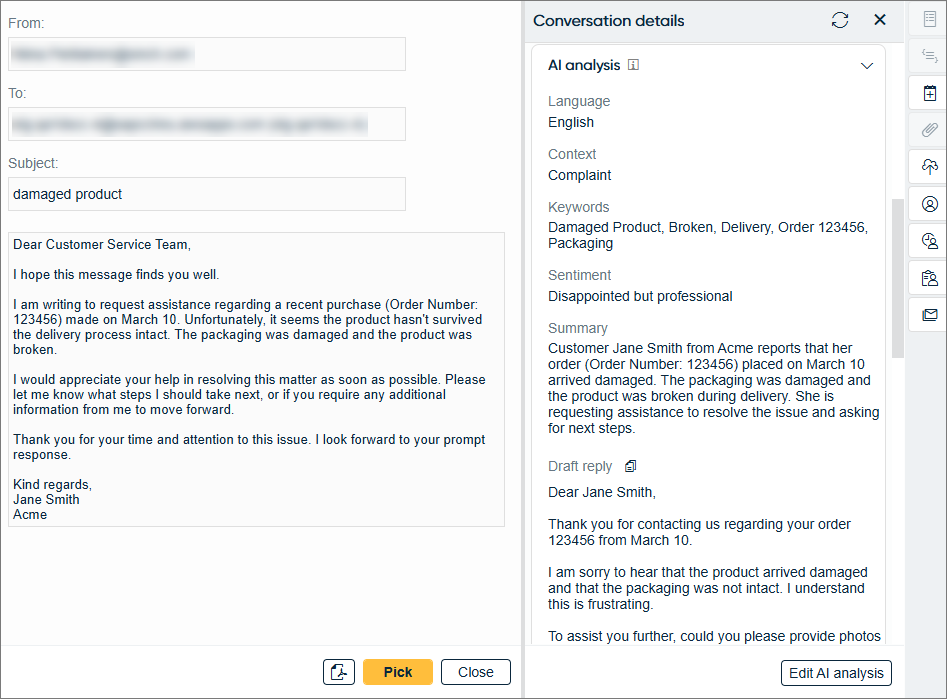
You can analyze an email's content using AI. The analysis is shown in Communication Panel when the email is received.
By default, the AI analysis shows you the following in the Conversation details extension:
- Language
- Context
- Keywords
- Sentiment
- Summary
- Draft reply
You can copy this draft reply by clicking the
 button.
In addition, you can customize the analysis by specifying instructions given to AI.
The AI analysis may take a while to appear. To refresh the view, click the refresh button
at the top right  .
.
If you see an Edit AI analysis button, you'll also be able to edit the analysis. This may be useful, for example, in case of inaccuracies in the analysis. If the analysis has been edited, the name of the agent and the timestamp of the edit is shown under the analysis.