
Patch corrections
Patch is a correction package that fixes business-critical issues.
We list here the issues fixed from RTC (release to customer) onwards.
To see which version your tenant has, open Communication Panel and go to . The patch number is the last digit in the Version field.
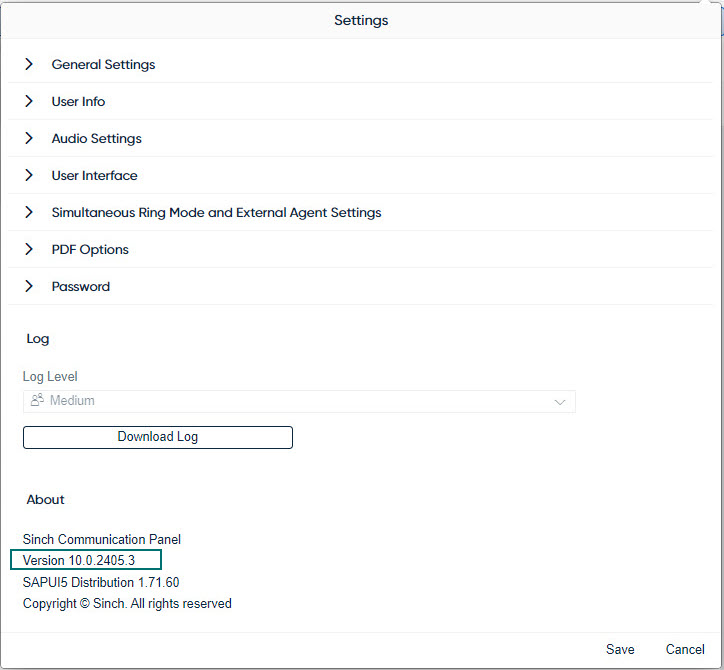
The latest patch includes fixes from all previous patches of the release. For example, corrections made in the first patch release are also in the second one, and so on.
You can request to have a patch applied to your system via a customer ticket.
26Q2.1 (10.0.2605.1) — added May 8 2026
Release to customer version
26Q2.2 (10.0.2605.2) — added May 8 2026
The My conversations list in Communication Panel now shows the following timers for active conversations:
-
Elapsed time since the conversation arrived (applies to calls, emails, and chats)
-
Elapsed time from customer’s last message (applies to chats)
-
Elapsed time from agent’s last message (applies to chats)
Sorting active conversations by elapsed time is also supported.
This functionality is currently available in beta and is subject to change. It may be officially released in a future version.
26Q2.3 (10.0.2605.3) — added May 19 2026
-
The CMI/contacts request with type=CallIn didn’t return all conversations that were active or handled within a day. ID: SCC-20207
-
The CMI/contacts request with the search parameter occasionally failed to use indexes, which increased the load on the Reporting database. Now the behavior of the search parameter in GET /RI/cmi/contacts is optimized when the parameter value doesn’t contain wildcards * or ?.
26Q2.4 (10.0.2605.4) — added July 6 2026
-
Occasionally, Conversation history and Conversation details extensions showed incorrect data. ID: SCC-19897, SCC-20069
-
When an image was inserted or pasted into the email body, it couldn’t be resized. ID: SCC-20381
26Q2.5 (10.0.2605.5) — added July 6 2026
Not released
26Q2.6 (10.0.2605.6) — added July 6 2026
Several customers have reported various audio issues, such as one-way audio where the agent can't hear the customer, but the customer can hear the agent.
Now a fix is available with the following conditions:
-
To have this patch applied to your system, create a customer ticket.
-
Once the fix has been applied, agents must log out of Communication Panel and refresh their browser, for example, by pressing F5 on the keyboard.
-
Even after this fix is applied, agents may still face a situation where the ringtone plays through a non-selected audio device. We are actively working on a resolution for this.