
Integration with Sinch Contact Pro and Chatlayer via Orchestrator
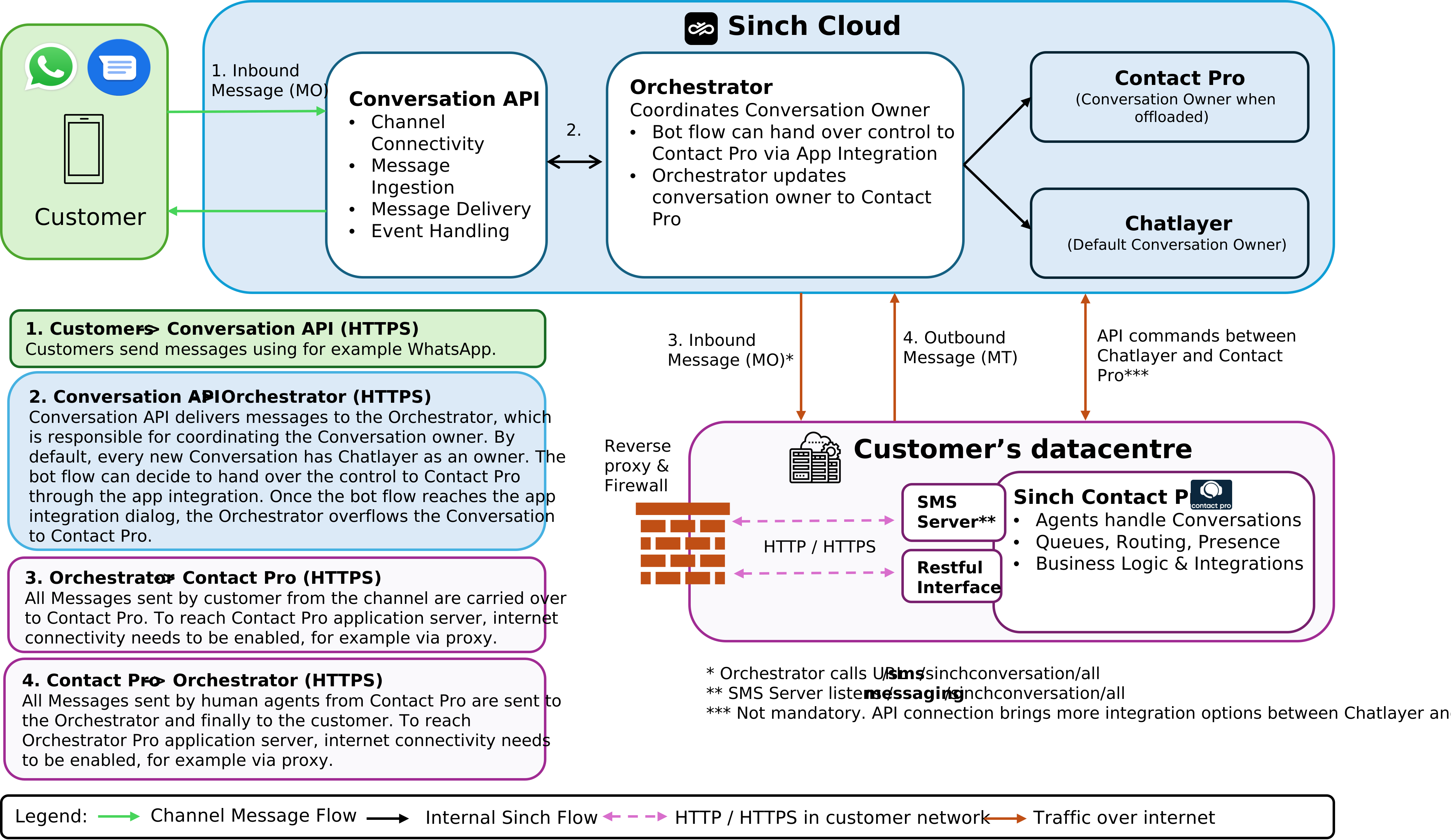
The Orchestrator, an integration component from Sinch, offers a method for connecting Chatlayer with Sinch Contact Pro.
This integration is the recommended method, and it resolves many of the limitations found in the standard handover from Chatlayer bot to a live Sinch Contact Pro agent:
-
Chatlayer can be configured as an independent module in front of Sinch Contact Pro.
-
Conversations handed over from Chatlayer keep their original subtype. For example, a WhatsApp chat will correctly appear as a WhatsApp chat in Sinch Contact Pro, not as a generic chat.
-
With Conversation API based channels, rich media such as images, videos, and PDF documents can be exchanged between the customer and the agent.
-
Any Chatlayer variable can be sent as Conversation Attached Data (CAD) to Sinch Contact Pro.
-
Chatlayer can define preferred or required agent in Sinch Contact Pro for the handed-over conversation.
-
Once the live agent chat in Sinch Contact Pro is ended, the conversation is automatically handed back to Chatlayer.
The Orchestrator integration method is currently available in the EU and US regions. To implement this solution, contact Sinch. The Orchestrator will eventually replace the existing Contact offload solution, which is no longer available.
Prerequisites
-
You need SMS Server, Chat Server, and Chain Matcher configured in your system.
-
Sinch Chatlayer and Sinch Conversation API are not included with Sinch Contact Pro. If you don't have these services, contact Sinch sales.
Internet access to application server
You need to configure the internet access to the Sinch Contact Pro application server. This access should be routed from the SMS Server to the internet. The recommended best practice is to set up this connection via a proxy server:
-
We recommend using HTTPS for the connection between the proxy and the application server, though HTTP is also supported.
-
The public URL on the proxy must be in the format of /sms/sinchconversation/all. The SMS Server listens for requests at /messaging/sinchconversation/all.
-
Configure the proxy to forward traffic as follows:
- incoming: /sms/sinchconversation/all
- forward to: [your server address]:[port]/messaging/sinchconversation/all
Optional: RESTful interfaces (RI)
You can also implement the RIs to enable features between Sinch Contact Pro and Chatlayer (such as checking agent availability, and creating callbacks and tasks). For more information, see the API documentation.
The best practice is to provide access to RI functionality through an API Gateway, such as NGINX.